
A self-watering garden that thinks for itself
I started adding plants to our garden, and I knew one thing for certain: I would never remember to water them. If this was going to work, it had to be low-maintenance — ideally zero-maintenance. So I did what I do with most problems around the house: I pointed Home Assistant at it.
Here's how a single 24 V valve turned into a weather-aware irrigation system that gives the plants exactly as much water as they need — and shuts itself off if anything goes wrong.
A confession before we start: I don't write any of this
I should be upfront, because it changes how you read the rest of this post. I haven't hand-written a single one of these automations. I can't really write Home Assistant YAML, and I don't want to.
What I actually do is talk to Claude (Anthropic's AI) connected to Home Assistant through an MCP connector. The connector gives the AI direct, read-and-write access to my Home Assistant — automations, scripts, helpers, dashboards, live sensor values, history. So instead of learning the automation editor, I describe what I want in plain language and Claude makes the changes for me, live.
A real example of the kind of thing I type:
Water the hedge three times a week, but instead of a fixed time, run it until it's delivered a set number of litres measured on the main water meter. And if water starts flowing uncontrolled at night, shut the main valve.
…and it goes and builds the helpers, the script, and the safety automations, then tells me what it did. When something's wrong, I just say so ("it only delivered 0.2 m³ but should've been 0.3") and we debug it together. It's genuinely iterative — more like pairing with an engineer than configuring software.
Is it perfect? No. It occasionally gets something subtly wrong, and I've learned to sanity-check the important bits and watch the first few runs. But for someone who wants a smart garden without becoming a Home Assistant expert, it's been remarkable. Everything below was built this way.
Step 1: Water deep, not often
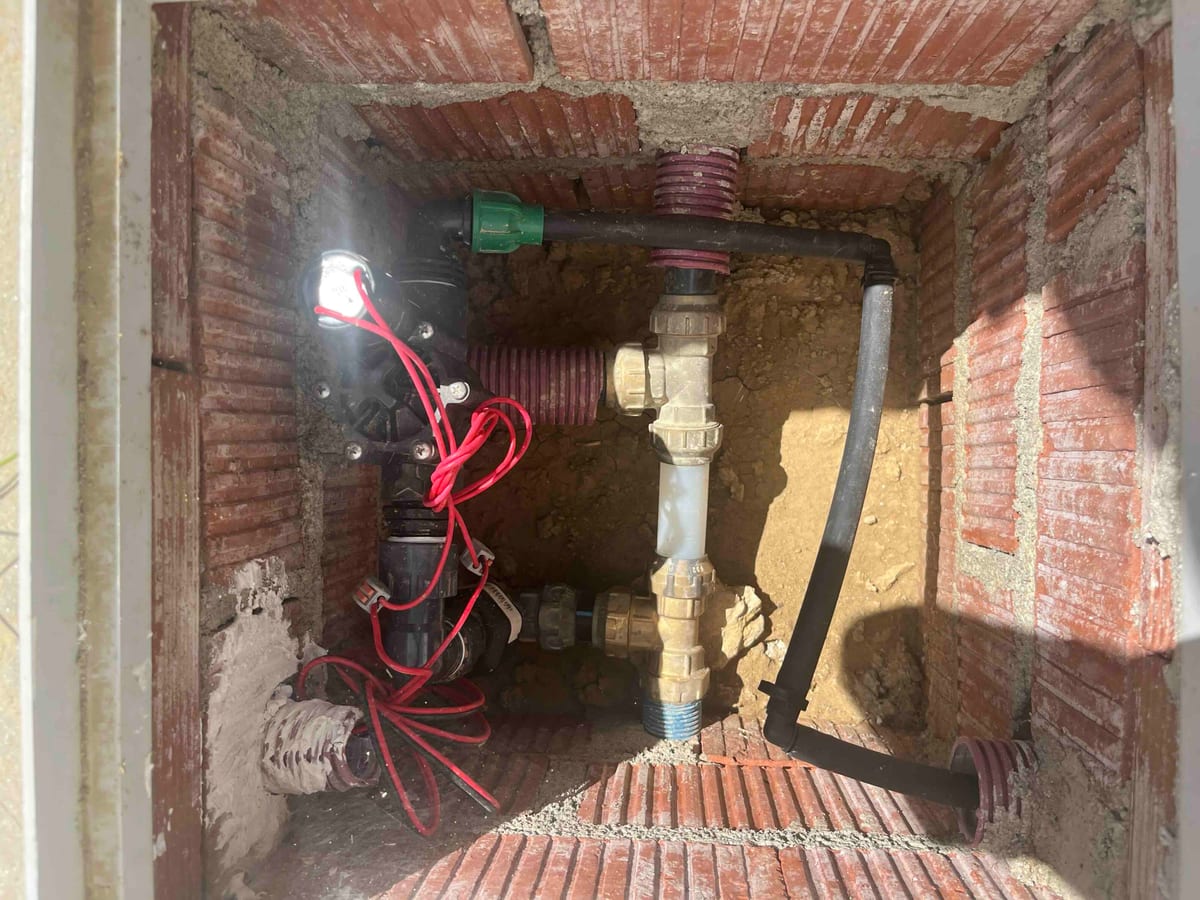
The first plants in were a newly planted hedge, fed by a length of drip hose and a 24 V electric valve.
Before automating anything, I read up (with the AI's help) on how you're actually supposed to water a hedge, and one idea stuck: don't water a little every day — water a lot, a few times a week. A big soak pushes water deep into the soil, and the roots grow downward chasing it. Shallow daily watering does the opposite: the roots stay near the surface where it's easy, and the plant becomes fragile the moment there's a dry spell. Deep roots = drought resilience. And with proper Spanish summers here, future-proofing against drought was the whole idea.
So the target became roughly three deep waterings a week.
Step 2: One valve today, six tomorrow
Rather than a single-valve box, I went with a 6-channel Shelly irrigation controller. Only one zone is wired up for now (the hedge), but the garden will grow and I'd rather run the cabling once.
The first version of the automation was gloriously dumb: open the valve for 70 minutes, three nights a week. Set a schedule, walk away. It worked… sort of.
Step 3: From "70 minutes" to "X litres"
Here's the problem with watering by time: our water pressure isn't constant. Some nights the drip hose runs strong, some nights it trickles. Same 70 minutes, wildly different amounts of water — no way to look after plants.
The fix was to measure the water instead of the clock. I added a Shelly NEO on the main supply — one device that's both a water meter and a shut-off valve. Because we always water at night, I can make a simple but powerful assumption: any water flowing at 2 a.m. is irrigation. Nothing else in the house is running.
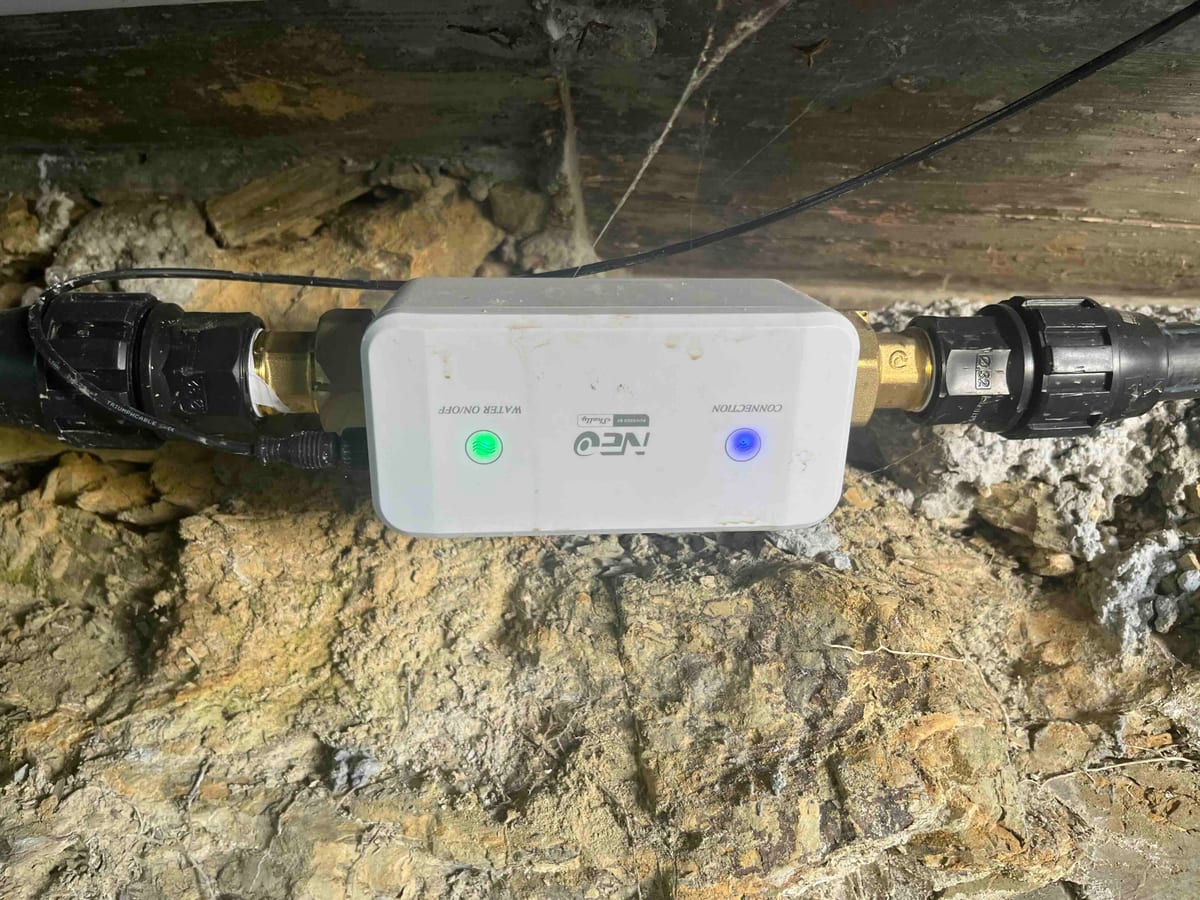
So there are two kinds of valve in this system, and it's worth keeping them straight:
- One NEO on the mains — it meters everything the house uses, and can cut the whole supply. This is the one that measures the litres, and the one the burst protection slams shut as a last resort.
- One 24 V valve per irrigation circuit, driven by the Shelly controller. These open and close individual zones. Right now only the hedge circuit exists.
How the volume-based watering actually works. The controller runs a little script whenever a zone waters:
- Read the whole-house water meter and remember the starting value.
- Open the zone valve.
- Wait, checking continuously, until
(meter_now − meter_start)reaches the target for that zone — e.g. 280 litres. - Close the valve, and record how much was actually delivered.
Pressure high or low, the plants get the same drink. The clock never enters into it.
That one water meter also unlocked the safety net, which is a set of separate automations all watching the same flow:
- Burst protection. If the flow rate spikes past a sane limit while a zone is open (a split hose, a blown fitting), it slams the zones shut, and if water is still flowing, closes the whole-house valve and alerts me.
- Blockage / no-flow. The opposite case — a valve says it's open but almost no water is moving — flags a clog or a failed valve.
- A hard backstop. If any zone is somehow open longer than it ever should be, it force-closes everything. Belt and braces.
- Slow-leak safety. Because I know what the nightly total should be, a small leak that quietly runs for hours doesn't slip through.
One subtlety we had to get right: the house already had a whole-home "water running too long" protection. When irrigation legitimately runs for an hour at night, that would look like a leak — so the irrigation tells the house-level guard "this one's expected" while it runs, then hands control back afterwards. Getting those two systems to cooperate instead of fighting took a couple of rounds of "no, that's not quite right" with the AI.
Step 4: Let the weather decide how much
Watering a fixed volume is better than a fixed time, but plants don't need a fixed volume either. A cool, cloudy, rainy week needs far less than a blazing, windy one. Watering the same amount regardless is either wasting water or stressing the plants.
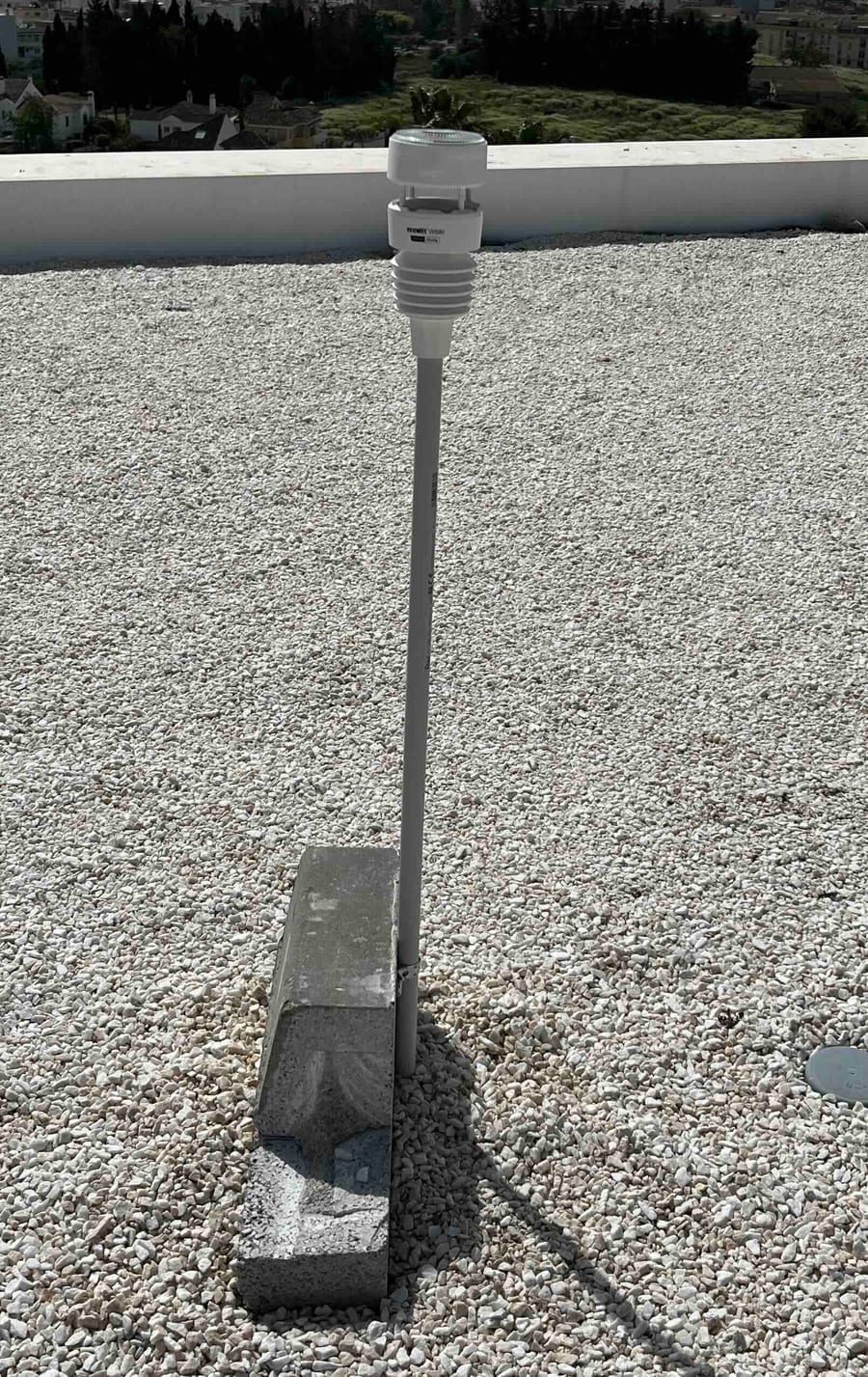
To close that loop I added a Shelly WS-90 weather station on the roof — it measures temperature, wind, humidity, UV and rainfall.
The weather coefficient. A sensor crunches the last 24 hours of weather into a single multiplier, roughly between 0.5 and 1.5:
- Hotter, windier, drier, more UV → higher (the plants transpired more and the soil dried out faster).
- Cooler, calmer, more humid → lower.
- Rain overrides everything: a light shower trims the number; a real downpour drops it to near zero because nature just did the watering.
The "water balance" — a bank account for the soil. This is the part I like most:
- Each zone has a baseline: about how many litres per day it wants in average conditions.
- Once a day, the system adds
baseline × weather_coefficientto a running "water debt" for that zone (a stored number that just goes up and down). Rain subtracts from it. - On watering nights, the valve runs until it has paid off the accumulated debt — then the debt resets by whatever was delivered.
Because we only water three nights a week, the debt quietly accumulates across the two-to-three-day gaps and gets settled in one deep soak — which is exactly the "deep, infrequent" watering the hedge wanted in Step 1. A hot week between waterings automatically produces a bigger soak; a wet one produces a token top-up, or gets skipped entirely. The whole thing comes full circle.
The gotcha (which I created for myself)
This one's on me, and it's a good lesson. When I first set the Shelly up as a plain 70-minute timer, I also set a 70-minute auto-off directly on the Shelly itself — a perfectly sensible safety at the time. Then I completely forgot I'd done it.
Then the software moved on to longer, volume-based runs — and that forgotten device-level setting quietly capped every run at exactly 70 minutes, no matter what the script asked for. It showed up on the very first volume-based run: the zone was supposed to deliver 0.3 m³ and stopped at 0.2. Baffling, until we compared "litres asked for" against "litres actually delivered" and saw it stop dead at 70:00.
The fix could have been as simple as removing that auto-off. Instead we kept it — as a genuine failsafe in case Home Assistant ever crashes mid-water — and added a "keep-alive" that re-pokes the valve every few minutes so the device timer keeps resetting before it can fire. Best of both worlds. The real lesson: when you automate something on top of hardware you configured months ago, check what you already left set on the device itself. The smartest software in the world can't see around a limit you baked into the relay.
The full recipe (copy-paste configs)
Here are the actual pieces from my Home Assistant, verbatim. Full disclosure again: I didn't hand-write these — I described what I wanted and Claude generated them through the connector — but they're the real thing, so anyone can copy them.
Before you paste: every entity_id below is mine. You'll need to swap in your own — your valves, your water meter, your weather sensors. The names that matter:
sensor.neowatervalve_48f6eebcf43c_water_consumption— the mains NEO's cumulative m³ reading.sensor.water_flow_rate_l_per_min— the NEO's live flow rate in L/min.valve.neowatervalve_48f6eebcf43c— the mains NEO's shut-off valve, only ever closed by the burst protection.valve.outside_kitchen,valve.zone_1…valve.zone_6— the six zone valves on the Shelly controller.sensor.weather_station_weather_*_24h— 24-hour aggregates from the WS-90 (see below).
1. The 24-hour weather aggregates (Statistics helpers)
The weather factor needs "what were conditions like over the last day," so each raw WS-90 sensor feeds a Statistics helper. Point these at your own weather sensors:
# Settings → Devices & Services → Helpers → Statistics (one per line below),
# or the YAML equivalent:
sensor:
  - platform: statistics
    name: "Weather temp max 24h"          # sensor.weather_station_weather_temp_max_24h
    entity_id: sensor.weather_station_temperature
    state_characteristic: value_max
    max_age: { hours: 24 }
  - platform: statistics
    name: "Weather wind mean 24h"
    entity_id: sensor.weather_station_wind_speed
    state_characteristic: mean
    max_age: { hours: 24 }
  - platform: statistics
    name: "Weather humidity mean 24h"
    entity_id: sensor.weather_station_humidity
    state_characteristic: mean
    max_age: { hours: 24 }
  - platform: statistics
    name: "Weather uv max 24h"
    entity_id: sensor.weather_station_uv_index
    state_characteristic: value_max
    max_age: { hours: 24 }
  - platform: statistics
    name: "Weather rain 24h"
    entity_id: sensor.weather_station_rain_total   # a cumulative rain counter
    state_characteristic: change                   # mm of rain in the window
    max_age: { hours: 24 }
2. The weather coefficient (Template sensor)
This turns those aggregates into a single 0.5–1.5 multiplier, with a rain override:
template:
  - sensor:
      - name: "Irrigation Weather Factor"
        unit_of_measurement: "x"
        state: >
          {% set temp = states('sensor.weather_station_weather_temp_max_24h') | float(25) %}
          {% set wind = states('sensor.weather_station_weather_wind_mean_24h') | float(1) %}
          {% set hum  = states('sensor.weather_station_weather_humidity_mean_24h') | float(60) %}
          {% set uv   = states('sensor.weather_station_weather_uv_max_24h') | float(3) %}
          {% set rain = [ states('sensor.weather_station_weather_rain_24h') | float(0), 0 ] | max %}
          {% set d_temp = (temp - 22) * 0.03 %}   {# +3% per °C above 22 #}
          {% set d_wind = wind * 0.03 %}          {# windier = drier #}
          {% set d_hum  = (55 - hum) * 0.004 %}   {# drier air = more need #}
          {% set d_uv   = (uv - 4) * 0.02 %}      {# stronger sun = more need #}
          {% set factor = 1 + d_temp + d_wind + d_hum + d_uv %}
          {% set factor = [[factor, 1.5] | min, 0.5] | max %}
          {% if rain >= 8 %}{% set factor = 0 %}
          {% elif rain >= 3 %}{% set factor = factor * 0.4 %}
          {% elif rain >= 1 %}{% set factor = factor * 0.7 %}{% endif %}
          {{ factor | round(2) }}
3. The two numbers per zone (Input Number helpers)
One holds the baseline litres/day, the other is the running water debt:
input_number:
  irrigation_base_outside_kitchen:      # ~85 for my hedge; tune to your plants
    name: Irrigation base (Outside kitchen)
    min: 0
    max: 500
    step: 1
    unit_of_measurement: L
  irrigation_deficit_outside_kitchen:   # the "debt" – the system manages this
    name: Irrigation deficit (Outside kitchen)
    min: 0
    max: 600
    step: 1
    unit_of_measurement: L
4. Add the day's need to the debt (nightly, 22:00)
alias: Irrigation daily water need (bucket)
triggers:
  - trigger: time
    at: "22:00:00"
actions:
  - action: input_number.set_value
    target:
      entity_id: input_number.irrigation_deficit_outside_kitchen
    data:
      value: >
        {{ [ states('input_number.irrigation_deficit_outside_kitchen') | float(0)
             + states('input_number.irrigation_base_outside_kitchen') | float(0)
               * states('sensor.irrigation_weather_factor') | float(1),
             600 ] | min | round(0) }}
mode: single
5. Water on schedule (Mon/Wed/Sat, 02:00)
alias: Zone 2 irrigation schedule
triggers:
  - trigger: time
    at: "02:00:00"
conditions:
  - condition: time
    weekday: [mon, wed, sat]
actions:
  - action: script.irrigation_run_zone
    data:
      valve_entity: valve.outside_kitchen
      deficit_entity: input_number.irrigation_deficit_outside_kitchen
mode: single
6. The volume-based run script (the heart of it)
Reusable across zones: pass it a valve and its debt helper. It opens the valve, waits until the whole-house meter shows the target litres delivered, then closes and reduces the debt by what actually flowed. The repeat/5-minute re-open is the keep-alive that defeats the Shelly's on-device auto-off; the 125-minute check is a hard cap.
irrigation_run_zone:
  alias: Irrigation run zone (bucket-based)
  mode: single
  fields:
    valve_entity:
      description: Zone valve entity_id
      selector: { entity: { domain: valve } }
    deficit_entity:
      description: Zone deficit input_number entity_id
      selector: { entity: { domain: input_number } }
  sequence:
    - variables:
        target_l: "{{ states(deficit_entity) | float(0) | round(0) }}"
        start_m3: "{{ states('sensor.neowatervalve_48f6eebcf43c_water_consumption') | float(0) }}"
        start_ts: "{{ as_timestamp(now()) }}"
    - if: "{{ target_l | float(0) <= 0 }}"
      then:
        - stop: "Skipped - deficit is zero"
    - repeat:
        sequence:
          - action: valve.open_valve
            target: { entity_id: "{{ valve_entity }}" }
          - wait_template: >
              {{ (states('sensor.neowatervalve_48f6eebcf43c_water_consumption') | float(0) - start_m3) * 1000
                 >= target_l | float(0) }}
            timeout: { minutes: 5 }        # re-assert the valve every 5 min (keep-alive)
            continue_on_timeout: true
        until:
          - condition: template
            value_template: >
              {{ ((states('sensor.neowatervalve_48f6eebcf43c_water_consumption') | float(0) - start_m3) * 1000
                   >= target_l | float(0))
                 or ((as_timestamp(now()) - start_ts) > (125 * 60)) }}   # 125-min hard cap
    - action: valve.close_valve
      target: { entity_id: "{{ valve_entity }}" }
    - action: input_number.set_value          # reduce the debt by what was delivered
      target: { entity_id: "{{ deficit_entity }}" }
      data:
        value: >
          {{ [ target_l | float(0)
               - (states('sensor.neowatervalve_48f6eebcf43c_water_consumption') | float(0) - start_m3) * 1000,
               0 ] | max | round(0) }}
7. "Any zone open?" helper (used by the safety rules)
template:
  - binary_sensor:
      - name: "Any irrigation zone open"
        state: >
          {{ expand('valve.outside_kitchen','valve.zone_1','valve.zone_3',
                    'valve.zone_4','valve.zone_5','valve.zone_6')
             | selectattr('state','eq','open') | list | count > 0 }}
8. Safety: burst detection
alias: Irrigation burst protection
triggers:
  - trigger: numeric_state
    entity_id: sensor.water_flow_rate_l_per_min
    above: 10
    for: { seconds: 60 }
conditions:
  - condition: state
    entity_id: binary_sensor.any_irrigation_zone_open
    state: "on"
actions:
  - action: valve.close_valve                 # close the zones first
    target:
      entity_id:
        [valve.outside_kitchen, valve.zone_1, valve.zone_3,
         valve.zone_4, valve.zone_5, valve.zone_6]
  - delay: { seconds: 20 }
  - if:
      - condition: numeric_state
        entity_id: sensor.water_flow_rate_l_per_min
        above: 5
    then:                                     # still flowing → close the house main
      - action: valve.close_valve
        target: { entity_id: valve.neowatervalve_48f6eebcf43c }
      - action: persistent_notification.create
        data:
          title: "🚨 Irrigation burst - house main closed"
          message: "High flow continued after closing the zones. Likely a broken line. Check, then reopen the main."
    else:
      - action: persistent_notification.create
        data:
          title: "⚠️ Possible irrigation burst"
          message: "Flow spiked above ~10 L/min during watering; zones were closed and the water stopped."
mode: single
9. Safety: blockage / no-flow
alias: Irrigation blockage / no-flow
triggers:
  - trigger: numeric_state
    entity_id: sensor.water_flow_rate_l_per_min
    below: 0.5
    for: { minutes: 3 }
conditions:
  - condition: state
    entity_id: binary_sensor.any_irrigation_zone_open
    state: "on"
actions:
  - action: valve.close_valve
    target:
      entity_id:
        [valve.outside_kitchen, valve.zone_1, valve.zone_3,
         valve.zone_4, valve.zone_5, valve.zone_6]
  - action: persistent_notification.create
    data:
      title: "⚠️ Irrigation: no water flow"
      message: "A zone was open but almost no water flowed for 3 min - blockage, closed supply, or failed valve."
mode: single
10. Safety: hard backstop (replaces the on-device timer)
alias: Irrigation zone safety backstop
triggers:
  - trigger: state
    entity_id:
      [valve.outside_kitchen, valve.zone_1, valve.zone_3,
       valve.zone_4, valve.zone_5, valve.zone_6]
    to: "open"
    for: { minutes: 130 }        # script normally closes at its 125-min cap
actions:
  - action: valve.close_valve
    target:
      entity_id:
        [valve.outside_kitchen, valve.zone_1, valve.zone_3,
         valve.zone_4, valve.zone_5, valve.zone_6]
  - action: persistent_notification.create
    data:
      title: "⚠️ Irrigation safety cutoff"
      message: "A zone was open over 130 min and was force-closed as a failsafe."
mode: single
11. Play nicely with whole-house leak protection
My house also has a "water's been running too long → shut the main" protection. Legitimate hour-long irrigation would trip it, so irrigation temporarily flags itself as an expected load — using an ownership flag so it never overrides a manual override (like filling the pool):
alias: Irrigation pauses whole-house water protection
triggers:
  - trigger: state
    entity_id: binary_sensor.any_irrigation_zone_open
    to: "on"
    id: started
  - trigger: state
    entity_id: binary_sensor.any_irrigation_zone_open
    to: "off"
    id: ended
actions:
  - choose:
      - conditions:
          - condition: trigger
            id: started
          - condition: state
            entity_id: input_boolean.water_protection_override
            state: "off"
        sequence:
          - action: input_boolean.turn_on
            target: { entity_id: input_boolean.water_protection_override }
          - action: input_boolean.turn_on
            target: { entity_id: input_boolean.irrigation_owns_water_override }
      - conditions:
          - condition: trigger
            id: ended
          - condition: state
            entity_id: input_boolean.irrigation_owns_water_override
            state: "on"
        sequence:
          - action: input_boolean.turn_off
            target: { entity_id: input_boolean.water_protection_override }
          - action: input_boolean.turn_off
            target: { entity_id: input_boolean.irrigation_owns_water_override }
mode: queued
That's the whole system. Adding a second zone is mostly copy-and-rename: a new base/deficit pair, one line in the nightly bucket automation, and a schedule that calls the same irrigation_run_zone script with the new valve.
Where it's at
Right now it's one hedge: watered deeply three nights a week, by volume, adjusted for the weather, with leak and burst protection keeping watch — all on a dashboard I barely need to open, and all built by describing what I wanted rather than writing any code myself.
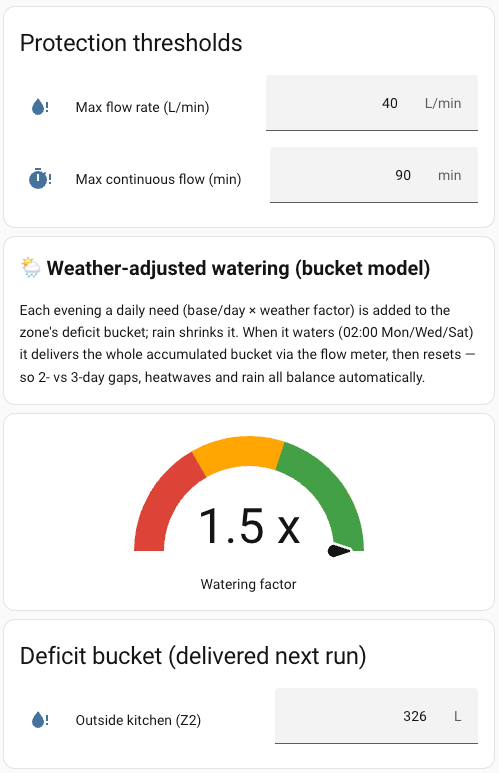
That screenshot is a fair snapshot of a Spanish July: the watering factor is pinned at 1.5×, its maximum, and the hedge has run up a 326 L debt to be settled on the next watering night.
And crucially: I still don't have to remember to water anything. Which was the entire point.
Next up: more zones, each carrying its own baseline and schedule. The other five channels are waiting — and I already know I won't be writing the automations for them either.