
Drizzle migrations on Cloudflare D1
Drizzle is now my favourite ORM for SQL databases in TypeScript. I used Kysely for a while and it was fine, but a few things push me towards Drizzle:
- The TypeScript types are generated from the same schema file used for migrations, so there's a single source of truth. With Kysely you have to keep the types in sync with the migration files yourself, which is one of those things that's easy to get subtly wrong.
- Migrations are plain SQL files, so it's obvious what's going to happen and you can apply them by hand to any database that speaks SQL.
- Built-in support for Cloudflare D1. Or rather the other way around — Wrangler can apply a folder of SQL files, and that's what Drizzle produces.
- It treats MySQL, Postgres and SQLite as genuinely different. They're similar but not identical, and Kysely flattening them into one API always felt like a leaky abstraction.
drizzle-kit studiois nice — a unified UI for browsing and editing any SQL database.
Installation and config
Install the ORM, the Drizzle kit, and the database driver. I'm using better-sqlite3 for the local database:
yarn add drizzle-kit @types/better-sqlite3 -D
yarn add drizzle-orm better-sqlite3 -S
Add a drizzle.config.ts — you can have multiple config files but this is the default name:
export default {
  schema: './src/schema.ts',
  out: './drizzle',
  driver: 'better-sqlite',
  dialect: 'sqlite',
  dbCredentials: {
    url: 'db.sqlite',
  },
};
The schema lives in src/schema.ts:
import { relations } from 'drizzle-orm';
import { primaryKey, sqliteTable, text } from 'drizzle-orm/sqlite-core';

export const users = sqliteTable('users', {
  id: text('id').primaryKey(),
  name: text('title').notNull(),
});
Migrations
Drizzle handles migrations by diffing the schema file against the current state. Running npx drizzle-kit generate produces a new SQL migration file plus some metadata to track what's been generated.
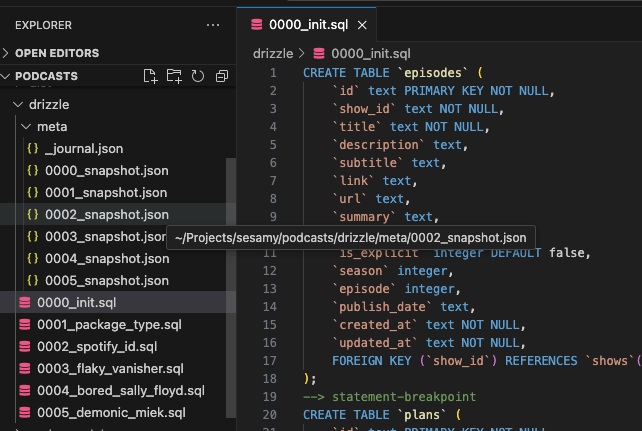
Generating doesn't touch the database though. This little script applies the migrations — I assume there's a built-in way to do this, but I haven't found it:
// scripts/migrate.ts
import Database from 'better-sqlite3';
import { drizzle } from 'drizzle-orm/better-sqlite3';
import { migrate } from 'drizzle-orm/better-sqlite3/migrator';
import * as schema from '../src/schema';

const sqlite = new Database('db.sqlite');
const db = drizzle(sqlite, { schema });

async function init() {
  console.log('Migrating database...');
  try {
    await migrate(db, { migrationsFolder: './drizzle' });
    console.log('Database migrated');
  } catch (error) {
    console.error('Migration failed:', error);
  } finally {
    sqlite.close();
  }
}

init();
Run it:
npx ts-node scripts/migrate.tsFor D1 the same SQL files can be applied with wrangler d1 migrations apply, which is what I'll cover in a follow-up once I have a CI setup I'm actually happy with.